The Email Validator tool helps you technically check and clean up email lists before campaigns, imports, or CRM actions. You can validate individual addresses directly in text mode or upload larger lists via file and have them processed in the background.
This makes the tool suitable both for quick quality checks in day-to-day operations and for more extensive list cleanups. Instead of importing unchecked addresses into newsletters, sales processes, or CRM systems, you can see early on which contacts are valid, where risks exist, and which addresses are better excluded or handled separately.
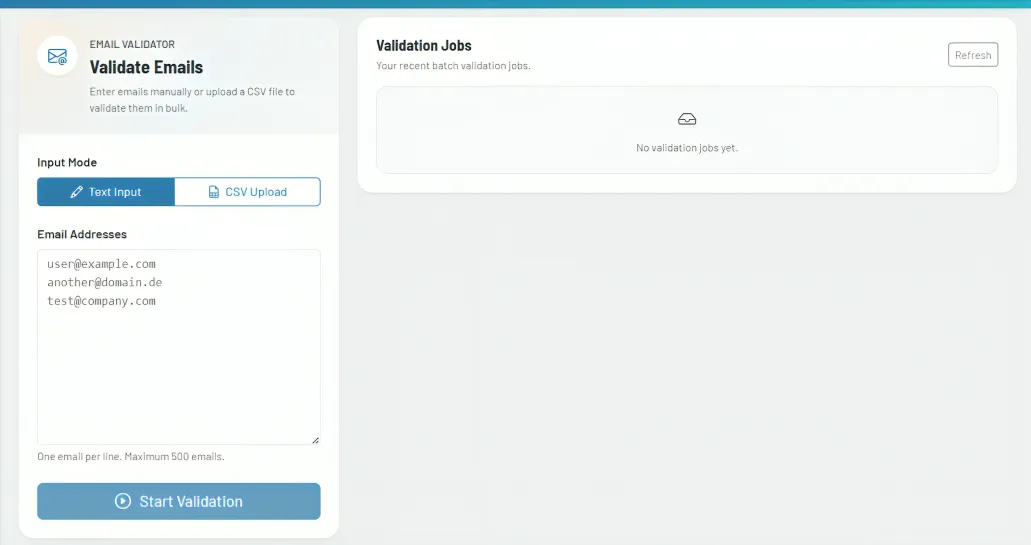
How the tool works in practice
First, you choose the appropriate input mode. For smaller volumes, the text input is suitable, where you paste addresses line by line. For larger datasets, you upload a CSV or text file and start a batch run from it. The tool detects the number of addresses and automatically guides you into the appropriate workflow.
For smaller lists, you receive the results directly in the same workspace. For larger uploads, the tool works with separate jobs that continue running in the background and can later be reopened, refreshed, canceled, or deleted. This is especially useful if you do not want to wait out longer checks in a single session.
In both modes, the evaluation remains clearly structured. For each address, you not only see an overall result, but also additional check criteria such as MX status, disposable address, role address, or catch-all behavior. This helps you better distinguish between clearly usable contacts, technically problematic cases, and addresses that appear reachable but should be treated with operational caution.
Core features and key views
- Text mode is intended for quick checks directly in the browser and provides an immediate table view of the results.
- The file and batch mode is suitable for larger lists. Jobs are saved separately and can be accessed again later without restarting the entire process.
- The results table shows, for each address, the overall status as well as additional columns for MX, Disposable, Role, and Catch-all. This gives you not just a yes-or-no result, but a differentiated quality assessment.
- Batch jobs have their own status indicators, progress values, and result statistics. This lets you see at a glance how many addresses have already been checked and how valid, risky, or unclear cases are distributed.
- Results can be exported, either as a complete list or reduced to valid contacts. This makes it easier to pass data on to CRM, newsletter systems, or other follow-up processes.
Recommended workflow
Use the quick mode for spontaneous checks of individual sources, for example before an import or when manually collecting leads. Work with batch jobs as soon as lists get larger or when you want to review and export results again later.
Do not rely solely on the overall status for cleanup. Pay particular attention to role addresses, catch-all results, and disposable domains. For sales and marketing, these are often addresses that appear technically deliverable but should be treated differently in terms of quality or strategy than personally assigned contacts.